Problem Overview
By default, HEDDA.IO stores Project data in a Microsoft SQL Server database. This means all Projects share the same storage space, there is no external version history, and read performance does not benefit from any distributed caching. In collaborative environments this creates friction: concurrent changes are harder to track, rollback requires manual intervention, and there is no natural boundary between one Project's data and another's.
In larger deployments, SQL Server storage also becomes a performance bottleneck as the number of Knowledge Bases and Members grows. Teams start noticing slower page loads in the Domain and Rulebook views, which impacts productivity during active development.
Solution
HEDDA.IO supports Git as an alternative storage backend. When a Project is connected to a Git repository, all Knowledge Base data is continuously synchronised between the HEDDA.IO server and the remote repository. This gives you external version history, recovery options, and a substantial read performance improvement - Git's file-based structure is much faster for the way HEDDA.IO reads Knowledge Base configurations.
The rule is one Project per repository. Sharing a repository between Projects by using separate branches is technically possible, but it creates unnecessary management overhead and makes the repository history harder to interpret. Keep concerns separated.
Configuration
- Open the Knowledge Base dashboard and find the 'Git' section on the right-side of the page
- Click 'Add' to open up the Git configuration drawer. If it's already configured, you will see the 'Edit' button instead
- Enter the repository URL and provide credentials or an access token for your Git server
- Set the Environment Branch Name. This is the branch HEDDA.IO will use to read and write Knowledge Base data. Name it to reflect the environment, for example: Main, Dev, or Prod
- Save the configuration. HEDDA.IO starts synchronising immediately
Outcome
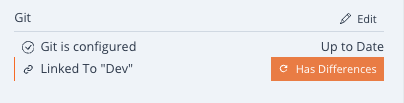
Once connected, Knowledge Base pages load noticeably faster. The Project Info Panel shows Git connection details, including a sync indicator. Two situations will arise as the team works: if two users make contradictory edits in separate Edit Versions, HEDDA.IO detects the conflict and presents a merge dialogue where you decide which change takes precedence. If the remote repository is updated outside HEDDA.IO, the application detects the difference and offers a synchronisation prompt to pull the latest changes in.
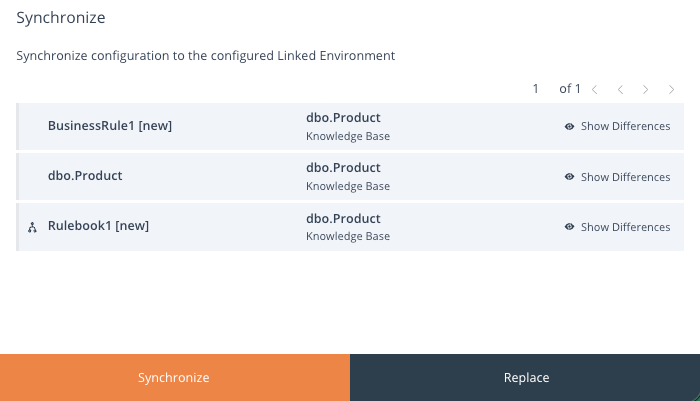
Tip: Separate Development, QA, and Production into three distinct HEDDA.IO Projects linked via Git branches. Build and test Knowledge Bases safely without touching live data, and promote changes only after they have been validated.
If you have any further questions, please feel free to Contact Us.
Was this article helpful?
That’s Great!
Thank you for your feedback
Sorry! We couldn't be helpful
Thank you for your feedback
Feedback sent
We appreciate your effort and will try to fix the article